
Why One Prompt Is Not Enough for a Good AI Email
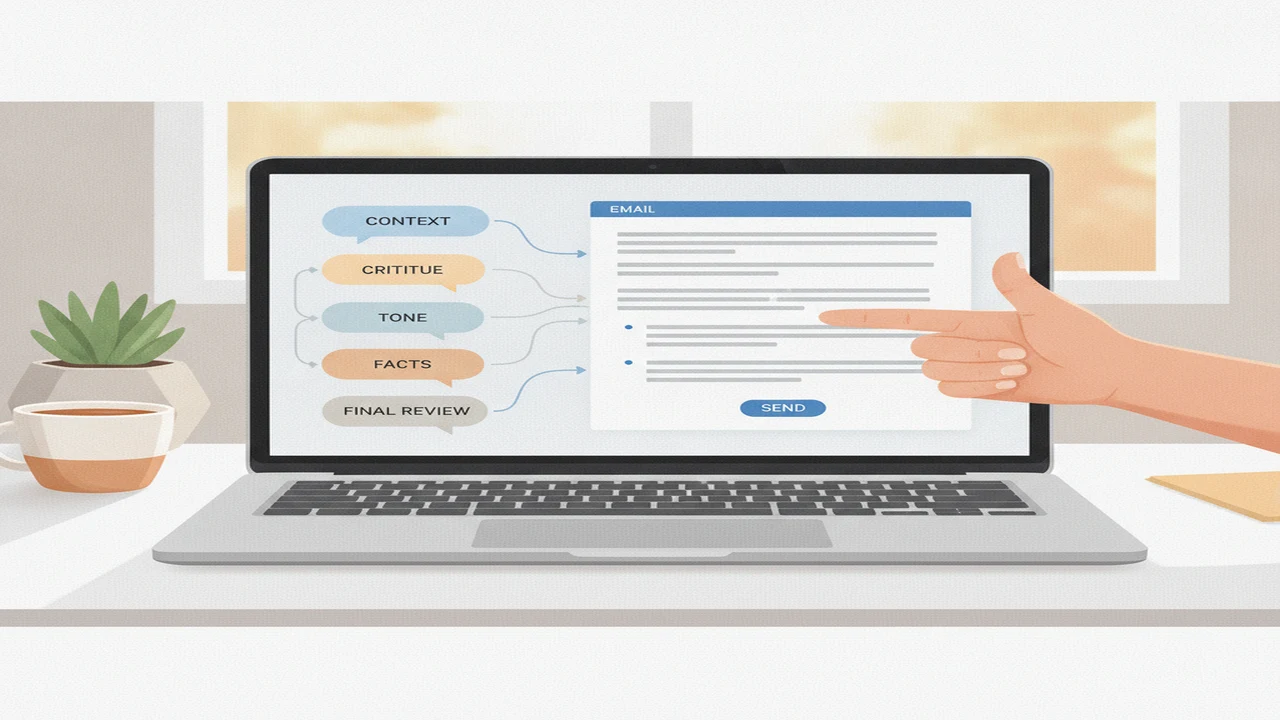
AI can write a grammatically polished email in seconds. That does not mean the message is appropriate for the recipient, faithful to the facts, or likely to produce the result you want. Fluency is only the visible layer of a good email.
The gap becomes clearer in usage research. Litmus reported in 2024 that 54% of surveyed marketers used AI for email content creation, while only 19% often accepted the first draft without more prompting or editing. HubSpot reported in 2023 that 82% of marketers using generative AI for copy considered detailed instructions and iteration very important, compared with 18% who felt simple prompts were enough.
Quick answer: A single prompt can produce a usable email, but it rarely captures the full situation, relationship, tone, and desired outcome. A stronger workflow uses several short exchanges: brief the AI chatbot, request a draft, critique weak points, revise the tone, and verify every claim. The model supplies speed, while the sender remains responsible for context, accuracy, and judgment.
Why does a one-prompt AI email often sound wrong?
A plausible email and a suitable email are different things. An AI email generator can arrange familiar professional phrases without understanding the relationship, history, stakes, or social consequences behind the message.
Consider the request, “Write a follow-up email.” The model does not know whether the recipient is a friendly colleague, an unresponsive sales lead, a hiring manager, or a customer waiting for a refund. It also lacks the previous deadline, what has already been promised, how urgent the response is, and what action the sender wants next.
A better brief might say: “Write to a long-term client who has not replied to last Tuesday’s proposal. Keep the tone warm and direct, avoid implying frustration, ask whether they can confirm a decision by Friday, and keep the body under 120 words.” That context narrows the model’s choices without asking it to invent a relationship.
Weak first drafts often open with generic pleasantries, use more deference than the sender normally would, or bury the request beneath unnecessary explanation. They may also add unsupported details, make the message too long, or finish without a clear call to action. These problems are difficult to prevent when the initial prompt supplies only a topic.
What context should you give an AI email writer?
A useful email brief identifies the recipient, your relationship, the objective, essential background, required facts, desired tone, maximum length, call to action, and wording to avoid. This works whether you are using an AI chatbot or a professional email generator.
Use tone labels with concrete boundaries. “Professional” is vague, while “direct but not hostile, confident without sounding entitled, and warm without apologizing” gives the model choices it can apply. The same principle helps create tone-controlled email drafts that remain consistent across revisions.
A reusable framework is: “Write an email to [recipient and role]. Our relationship is [context]. The purpose is [objective]. Relevant background: [summary]. Include only these confirmed facts: [facts]. Use a [tone] tone with these constraints: [boundaries]. Keep it to [length]. Ask the recipient to [action] by [time]. Do not use [phrases or claims].”
Summarize sensitive background rather than pasting complete medical, financial, employment, personal, or confidential records. Include only what the drafting task requires. If the source is a long attachment or email chain, extract and review the relevant facts before placing them in the prompt.
For multilingual email writing, add a second request that checks register, regional vocabulary, titles, and expected formality. A literal translation can be correct at sentence level while still sounding rude, distant, or unusually informal to the recipient.
- Recipient and relationship
- Purpose and desired outcome
- Relevant history and confirmed facts
- Tone with concrete boundaries
- Length, structure, and call to action
- Prohibited wording, assumptions, or commitments
How should a multi-prompt email workflow work?
The most useful workflow separates generation from evaluation. Instead of repeatedly asking the model to “make it better,” give each exchange a specific job. This follows the broader practice of iterative prompting with context and refinement.
At the critique stage, ask the AI to identify assumptions, vague sentences, missing context, tone risks, and an unclear call to action without rewriting anything yet. You can then decide which criticisms matter before requesting targeted edits.
Separate prompts can also control individual components: generate subject lines, replace only the opening, shorten the body, sharpen the requested action, and make the closing less formal. The human decision column in the workflow table is as important as the AI task because the model cannot decide which promise you are authorized to make.
For an AI follow-up email writer or email reply generator, branch according to the prior exchange. If there has been no response, ask for one low-pressure version and one time-sensitive version based on the same facts. Then choose the version that fits the real urgency rather than letting the model manufacture pressure.
For additional examples, see how follow-up questions refine AI email replies.
- Brief: Supply the recipient, relationship, objective, facts, constraints, and requested action.
- Draft: Ask for one complete version without requesting several competing styles at once.
- Critique: Identify assumptions, weak wording, missing context, tone risks, and call-to-action problems.
- Rewrite: Request specific changes to selected passages rather than a general improvement.
- Verify: Check names, dates, figures, promises, links, attachments, and references against source material.
- Personalize: Replace generic language with wording that matches your voice and relationship.
- Send: Approve the final meaning, timing, recipients, attachments, and commitments yourself.
Can comparing multiple AI models improve an email?
Multi-model comparison is most useful when models receive the same brief but perform different jobs. One can draft, another can critique clarity, and a third can shorten the result. Asking each model a different question makes the outputs harder to evaluate fairly.
Compare two or three outputs using a simple rubric: factual fidelity, tone, specificity, concision, recipient fit, and clarity of the next step. Majority agreement does not verify a fact because multiple systems may infer the same unsupported detail.
Select passages only after checking that the combined email has one voice. A direct opening, highly formal body, and casual closing can reveal that fragments were assembled without a final style pass.
AI chat with voice input can help when the relationship history is easier to explain aloud. Review the transcript before using it as a prompt because names, figures, negations, and technical terms can be transcribed incorrectly.
Readers deciding whether separate models add enough value can review this guide to AI chat tools for writing, research, and email. The goal is not to identify one universal best AI writer, but to assign each conversation a clear role.
When is a dedicated AI email tool more useful than chat?
General AI chat is usually enough for occasional drafting, unusual context, sensitive reasoning, and collaborative revision. The conversational format makes it easy to explain history, question assumptions, and refine individual sentences.
A dedicated email tool becomes more appealing when you repeatedly use the same templates, work inside an inbox-oriented process, need fast reply variations, or frequently adjust tone and writing preferences. The tradeoff is that a faster interface may encourage users to skip context and review.
Friday and Xemail are examples of email-focused options readers may encounter, although their current capabilities should be verified in public documentation. AI Email Writer - Boss is described around email templates, language cleanup, tone customization, adjustable writing preferences, and support for common mail workflows.
Trial and Pro conditions can change, so confirm current listing terms before purchasing. Grammarly and QuillBot occupy a somewhat different role: readers often use them for grammar checking or paraphrasing after a draft exists rather than for the full context-heavy conversation.
The choice is therefore about workflow, not a permanent winner. Our comparison of an AI chatbot and an email generator explains where repeated templates may save time and where chat retains an advantage.
How do you review an AI email before sending it?
Start with factual and operational details. Confirm every name, title, date, figure, deadline, hyperlink, attachment, quotation, promise, and reference to an earlier conversation. Check that attachments actually exist and that the recipient list is correct.
Next, ask whether the recipient can identify the requested action without interpreting vague hints. Confirm that you have the authority to offer every concession, deadline, refund, meeting, or future deliverable mentioned in the draft.
Read the email aloud. Remove generic phrases you would not normally use, simplify inflated politeness, and check whether the message sounds like one person from beginning to end. To humanize AI text responsibly is to improve clarity, specificity, rhythm, and personal voice, not to disguise misconduct.
A grammar checker can catch spelling, punctuation, and some sentence-level problems. It cannot determine whether the email is tactful, truthful, strategically sensible, or appropriate for the relationship.
GPTZero, ZeroGPT, and Originality analyze limited textual signals and cannot establish who authored an email. Detection and rewriting-oriented services such as StealthGPT, Undetectable AI, and NaturalWrite likewise do not replace factual or relational editing.
An AI text rewriter or AI paraphrasing tool can also change meaning while making a sentence sound smoother. Compare rewritten passages with the confirmed facts, especially where they discuss responsibility, timing, quantities, or commitments.
How does the workflow change for different kinds of email?
A follow-up should preserve the original request while adding a reason to respond now. The model can produce versions with different levels of urgency, but the sender must decide whether a deadline is real and whether another message is appropriate.
A customer-service reply needs an accurate account of what happened, what remedy is available, and who owns the next step. Avoid letting the model invent policy details or imply that a refund, replacement, or exception has already been approved.
For outreach, an AI outreach email generator should work from recipient-specific relevance and a concrete request. Generic compliments and invented familiarity usually weaken credibility, even if the wording is polished.
A job application email introduces the application and directs attention to the attached materials. It is not the same task as using an AI cover letter writer. Claims about qualifications, dates, employers, achievements, and experience must match the applicant’s records.
For sensitive workplace messages, use AI to organize events, questions, and requested actions. Keep human control over allegations, disciplinary language, escalation, and commitments that could affect another person.
A multilingual email writing assistant can help prepare a draft, but higher-stakes messages need review for formality, cultural expectations, names, and translated technical terms. A qualified speaker or subject specialist should review language where a subtle error could materially change the message.
What are the limits of using AI to write email?
The limits below apply to both general chatbots and dedicated email-writing tools. A checklist reduces avoidable mistakes but cannot guarantee that a message is accurate, private, appropriate, or safe to send.
Comparison
| Workflow stage | What to ask the AI | What the human must decide | Common failure to catch |
|---|---|---|---|
| Brief | Organize the supplied audience, goal, facts, tone, and constraints. | Which context is necessary and appropriate to share? | Missing history or unnecessary private information |
| First draft | Write one complete email from the approved brief. | Does the structure fit the real situation? | Generic wording or invented context |
| Critique | Flag assumptions, ambiguity, tone risks, and weak requests without rewriting. | Which criticisms require action? | Confident but irrelevant feedback |
| Targeted rewrite | Change named sentences, tone boundaries, length, or call to action. | Do the revisions preserve the intended meaning? | New claims introduced during rewriting |
| Fact check | List every factual claim and commitment for verification. | Does each item match an authoritative source? | Wrong names, dates, figures, links, or promises |
| Voice edit | Identify generic phrases and inconsistent register. | Does this sound natural for the sender and recipient? | Over-formality or mixed writing styles |
| Final approval | Produce a clean copy only after approved changes. | Should this message be sent now, to these recipients? | Missing attachments, wrong recipients, or unauthorized commitments |
Limitations
An AI email generator can invent context, dates, commitments, or prior interactions that were never provided. Fluent wording can also conceal a misunderstood relationship or an inappropriate tone, while several models may agree on the same unsupported assumption.
Pasting private correspondence into an AI service may disclose more information than the drafting task requires. Tool features, prices, trial conditions, privacy terms, and available models can also change after the article date, so current documentation matters when selecting a service.
Grammar checkers and AI content detector results cover limited signals. They cannot determine whether a message is truthful, appropriate, or genuinely written by a particular person. High-stakes employment, legal, medical, financial, disciplinary, or similarly consequential messages may require review by a qualified person.
Frequently Asked Questions
How many prompts does it take to write a good AI email?
There is no fixed number because a routine scheduling note needs less work than a negotiation or sensitive reply. Briefing, critique, targeted revision, and verification are more useful milestones than aiming for a particular prompt count.
What should I include in a prompt for a professional email?
Include the recipient, purpose, relevant context, confirmed facts, tone boundaries, desired length, and call to action. Also identify wording, assumptions, or commitments the draft must avoid.
Can an AI email writer match my personal tone?
Examples of your writing and explicit constraints can improve consistency. You should still complete the final voice edit because the model may imitate visible wording without understanding how your tone changes across relationships.
Is an AI email generator better than a grammar checker?
They perform different jobs. A generator can create or restructure a message, while a grammar checker mainly evaluates an existing draft for surface-level language problems.
Can I use Write.info for email drafts and replies?
Write.info is one option to consider for AI-assisted writing. Evaluate it against your preferred drafting process, privacy needs, current documentation, and the amount of human review your emails require.
Should I use an AI content detector on an email?
A detector score does not prove authorship and should not determine whether an email is acceptable. Review accuracy, appropriateness, specificity, and personal voice instead.
Can Write.info help rewrite an AI email so it sounds natural?
Write.info can be considered as part of a rewriting workflow, but natural editing should mean improving clarity, specificity, and personal voice. Check every revision against the original facts and intended commitment rather than using rewriting to evade detection.