
Best Contraction Timer Apps in 2026
Quick answer: Contraction Timer IO is the best contraction timer app for most families because a partner, doula, or relative can follow contractions live from another phone. Contraction Timer & Counter 9m is better if you want a basic timer with a long App Store history. Pregnancy+ suits anyone who wants pregnancy tracking and contraction timing in one app.
It's 3 a.m. Contractions are getting closer, your partner is hunting for the hospital bag, and nobody wants to calculate intervals on a notes app.
A good contraction timer handles the math with one button. The apps below track duration and frequency, but they differ sharply on live sharing, offline use, alerts, cost, and phone support. None can diagnose labor, so call your care team when you're unsure or have urgent symptoms.
Comparison at a glance
| App | Best for | Platforms | Free version | Price | Standout |
|---|---|---|---|---|---|
| Contraction Timer IO | Live partner and doula tracking | iPhone, iPad, Apple Watch, Android; browser link for followers | Core timing, history, strength tracking, and 5-1-1 alerts | Free; $1.99 weekly or $5.99 purchase listed | Private live family link |
| Contraction Timer & Counter 9m | Simple dedicated timing | iPhone, iPad, Android | Basic contraction timing; some history tools may be paid | Free; purchases from $2.99 listed | 69,312 US App Store ratings |
| Contraction Timer & Tracker | Labor preparation extras | iPhone, iPad, Apple Watch | Free download; exact limits aren't stated | Free; $1.99 weekly to $39.99 listed | Intensity colors, notes, and exercises |
| Storky | Sending a contraction summary | iPhone and iPad; Android availability is indicated | Core timer and saved history; exact limits aren't stated | Free; $2.99 Remove Ads purchase listed | Shareable monitoring overview |
| Full Term | Older iPhones and custom alerts | iPhone, iPad, Apple Watch | Contraction timer, kick counter, graphs, and history | Free; $0.99 to remove ads | Custom timing alerts |
| Pregnancy+ | Pregnancy tracking in one app | iPhone and iPad | Free download; contraction timer limit isn't stated | Free; purchases from $0.99 to $34.99 listed | Week-by-week tracking plus a timer |
| BabyCenter Pregnancy Tracker | Classes, community, and pregnancy tools | iPhone and iPad | Free download with a contraction timer | Free | Pregnancy resources beyond labor |
Prices and ratings from the US App Store and Google Play, checked October 2026. Store prices change; the listing is the final word.
How we picked
We read the US App Store listings for all seven apps, the available Google Play listing, listed in-app purchase panels, and the Contraction Timer IO site. Ratings, compatibility, prices, and update dates were checked in October 2026.
The order favors the job you'll do during labor: start timing fast, read the pattern, and share useful information. Rating counts show audience size, not which app fits this specific job. That's why the newer Contraction Timer IO ranks above apps with tens of thousands of ratings.
- The timer needs simple start and stop controls.
- Duration, frequency, and history must be easy to read.
- Sharing, offline timing, alerts, and watch access can reduce phone handling.
- Free limits and paid prices must be stated when known.
- Recent updates and phone requirements affect who can use the app.

Contraction Timer IO
4.8 on the App Store (88 ratings) · 4.0 on Google Play (701 reviews)
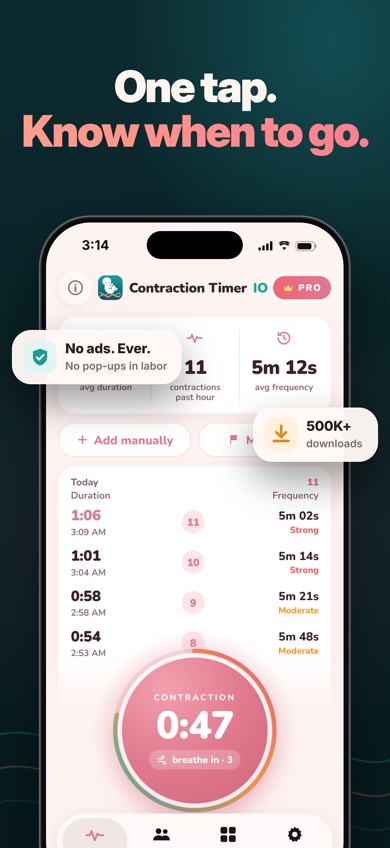
Contraction Timer IO is a dedicated contraction timer with a private live link. A partner, doula, or family member can follow from a browser on another phone, tablet, or computer. That's the strongest reason it ranks first: the person timing contractions doesn't have to keep reading numbers aloud while everyone is getting ready.
The app records duration, start-to-start frequency, rest intervals, and your own intensity rating. It also has 5-1-1 alerts, editable history, a breathing guide, labor phases, and a button for calling your provider. Timing works offline, with no account required. On Apple devices, you can start or stop from an Apple Watch or Lock Screen. Live sharing needs internet, and remote partner control is a Pro function.
Its audience is much smaller than 9m's. The US App Store showed 4.82 stars from 88 ratings, while Google Play showed 4.0 from 701 reviews and 50K+ installs. Those numbers don't prove fit, though. For this exact use, live viewing beats 9m's verified sharing options, which are limited to paid history editing and email export. One catch: the iPhone app needs iOS 17.0 or later.
- Private live link for partners, doulas, and family
- Offline timing with Apple Watch and Lock Screen controls
- No account needed for basic timing
- Live sharing needs an internet connection
- The iPhone version requires iOS 17.0 or later
- Price
- Checked October 2026: free; $1.99 weekly and $5.99 Contraction Tracker & Timer+ purchases are listed.
- Platforms
- iPhone, iPad, Apple Watch, and Android; followers can use a browser.
Pick Contraction Timer IO if another person needs to follow your contraction pattern live from a separate device.
Contraction Timer IO contraction timer app for iPhoneContraction Timer IO for Android

Contraction Timer & Counter 9m
4.8 on the App Store (69,312 ratings)
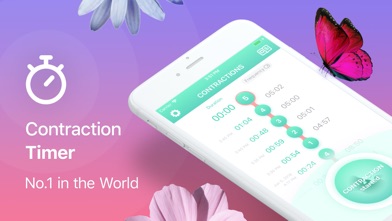
Contraction Timer & Counter 9m is the established, stripped-down choice. Tap once when a contraction begins and again when it ends; the app calculates duration and frequency, records intensity, and analyzes the pattern. If you want a familiar contraction timer without a broader pregnancy dashboard, 9m is an easy recommendation.
Its big advantage is history in the everyday sense: the app dates to 2014 and had 4.79 stars from 69,312 US App Store ratings in October 2026. It also runs on iOS 15.0 or later, so it supports older iPhones than Contraction Timer IO. Thirty-two listed languages make it the broadest language choice here. Android is available too.
The tradeoff is coordination. We couldn't verify a live browser link, partner view, Apple Watch app, or offline mode from the listing. Available research says basic tracking is free, while editing and emailing history may require payment. The purchase panel lists $2.99 and $5.99 options without making every billing term plain, so check the listing before confirming. Pick 9m for simplicity and older-device support; choose IO when live help from another person is the bigger need.
- One-button timing with pattern analysis
- Works on iOS 15.0 or later
- Large US App Store rating history
- No verified live partner view
- Exact free limits and purchase terms aren't fully stated
- Price
- Checked October 2026: free; $2.99 and $5.99 in-app purchases are listed.
- Platforms
- iPhone, iPad, and Android.
Pick Contraction Timer & Counter 9m if you want a basic timer with older-iPhone support and a long store record.

Contraction Timer & Tracker (Going Merry)
4.6 on the App Store (50,085 ratings)
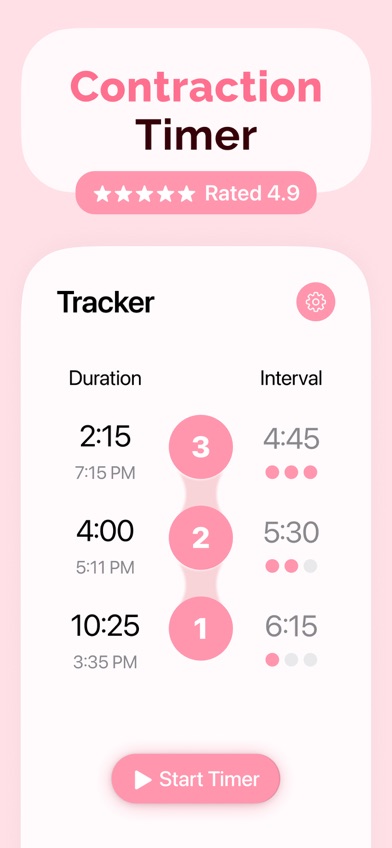
Contraction Timer & Tracker goes beyond start and stop times. It calculates duration, frequency, intervals, and averages, then adds color-coded intensity, notes, graphs, and a full-screen mode. You can correct an entry if someone misses a tap. There's Apple Watch support too, which is useful when the phone is across the room.
The extra labor tools separate it from 9m and Storky. Its listing includes a hospital bag checklist and pain-relief exercises, so you can keep late-pregnancy preparation and contraction records together without moving to a full pregnancy tracker. The US App Store showed 4.63 stars from 50,085 ratings, and the app was updated September 29, 2026.
Cost is the awkward part. The listing shows several weekly and annual prices, from $1.99 per week to $39.99 for one listed purchase, and the exact free limits aren't stated. It also needs iOS 17.0 or later, has only one listed language, and we found no confirmed Android version. This is a strong Apple-device pick when notes, intensity charts, exercises, and a watch app are more useful to you than live remote sharing.
- Apple Watch timing and full-screen controls
- Intensity colors, graphs, notes, and editable entries
- Hospital bag list and pain-relief exercises
- Needs iOS 17.0 or later
- Paid options are more complex than most rivals
- Price
- Checked October 2026: free download; listed purchases run from $1.99 weekly to $39.99.
- Platforms
- iPhone, iPad, and Apple Watch.
Pick Contraction Timer & Tracker if you want detailed labor records and preparation tools on Apple devices.

Storky
4.9 on the App Store (1,927 ratings)
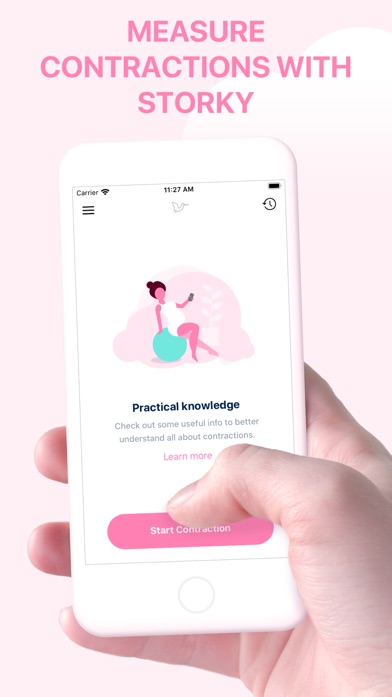
Storky keeps its attention on contraction length and the intervals between contractions. One tap starts timing, another stops it, and the history puts prior sessions in one place. It also provides basic information about contractions and can notify you when the recorded pattern suggests it may be time to consider the hospital or birth center.
Its useful twist is sharing a monitoring overview through email or another app. That isn't the live, second-by-second link found in Contraction Timer IO, but it may be enough when your doctor or birth assistant asks for a recent summary. Storky had 4.85 stars from 1,927 US App Store ratings and was updated October 6, 2026. It works on iPhone and iPad, while available listing evidence also indicates an Android version.
There's a pricing wrinkle. The description calls Storky free of ads, yet the purchase panel lists a $2.99 Remove Ads option. Check the current storefront before labor so you know what appears in the free version. We also couldn't confirm watch controls, editable entries, custom alerts, or live partner access. Storky is best when you want a focused timer and a summary you can send, without the extra screens found in Pregnancy+ or BabyCenter.
- Simple start and stop timing
- Saved sessions and shareable summaries
- Updated in October 2026
- No verified live partner view or watch controls
- The ad wording and listed purchase conflict
- Price
- Checked October 2026: free; a $2.99 Remove Ads purchase is listed.
- Platforms
- iPhone and iPad; Android availability is indicated by available listing evidence.
Pick Storky if you want an uncomplicated timer with a contraction overview you can send.

Full Term
4.8 on the App Store (7,226 ratings)
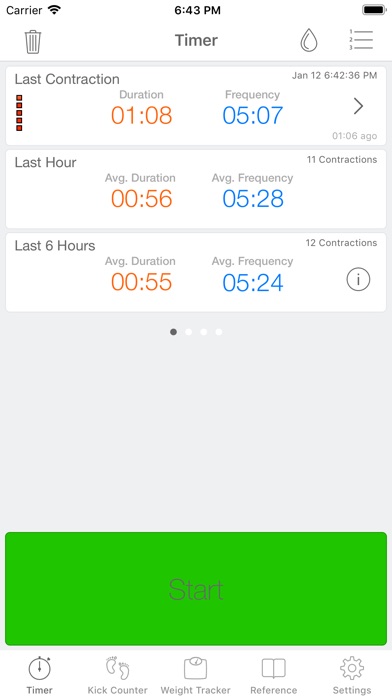
Full Term is the oldest dedicated timer in this group, first released in 2010. It records start times, duration, frequency, intensity, notes, and water breaking. You can add missed contractions, fix entries, view graphs, or email the history. Its 5-1-1 alert can also be changed to match instructions from your care team.
Compatibility is its best reason to download it in 2026. Full Term needs only iOS 11.0, while several newer picks require iOS 17. It supports iPad and Apple Watch, and it includes a fetal kick counter and pregnancy weight tracker. The US App Store showed 4.75 stars from 7,226 ratings. Removing ads costs just $0.99, the lowest clearly stated paid price here.
Age cuts both ways. The last listed update was September 25, 2019, far earlier than every other app in this ranking. That doesn't mean the timer has stopped working, but a seven-year update gap raises questions about future phone compatibility and support. There's no confirmed Android version or live partner display. Full Term still makes sense on an older iPhone, especially if you want custom alerts and editable records for very little money.
- Runs on iOS 11.0 or later
- Custom alerts, editable history, graphs, and notes
- Apple Watch and kick counter support
- Last updated in September 2019
- No confirmed Android app or live partner view
- Price
- Checked October 2026: free; $0.99 removes ads or supports the app.
- Platforms
- iPhone, iPad, and Apple Watch.
Pick Full Term if you have an older iPhone or want customizable contraction alerts for under a dollar.

Pregnancy+
4.9 on the App Store (76,799 ratings)
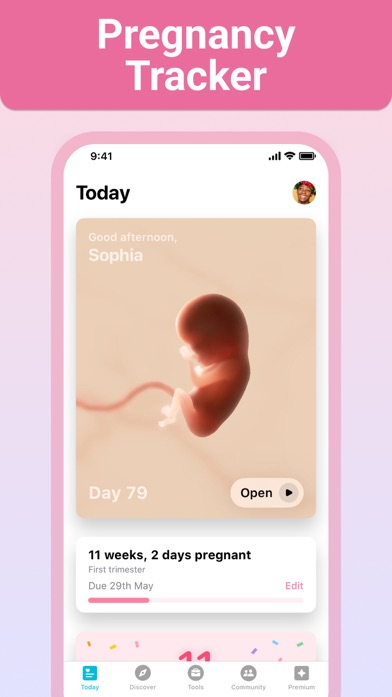
Pregnancy+ puts a contraction timer inside a much larger pregnancy app. Along with measuring contractions, it has week-by-week information, interactive fetal models, a kick counter, weight log, due date calculator, hospital bag list, birth plan, appointments, and baby-name tools. It's a sensible choice if you already use one app throughout pregnancy and don't want a second download near your due date.
The app had 4.85 stars from 76,799 US App Store ratings and was updated August 10, 2026. It supports iPhone and iPad, requires iOS 16.4 or later, and lists 14 languages. Those figures show a large audience, but they don't tell us how its timer compares with dedicated apps during active labor.
The listing says the timer measures contractions, yet it doesn't spell out live sharing, offline operation, watch controls, editing, custom thresholds, or the timer's free limit. The larger dashboard may also feel busy if contraction timing is the only job you need done. Purchases range from $0.99 point bundles to a $34.99 annual plan, with several premium terms listed. Choose Pregnancy+ for continuity across pregnancy; choose a dedicated timer for better-documented labor controls.
- Contraction timing inside a full pregnancy tracker
- Kick counter, birth plan, and hospital bag tools
- Fourteen listed languages
- Timer details and free limits aren't fully stated
- No confirmed watch controls or live partner link
- Price
- Checked October 2026: free; listed purchases range from $0.99 to $34.99.
- Platforms
- iPhone and iPad.
Pick Pregnancy+ if you want one app for week-by-week pregnancy tracking and occasional contraction timing.

BabyCenter Pregnancy Tracker
4.9 on the App Store (298,423 ratings)

BabyCenter Pregnancy Tracker includes contraction timing as one tool in a broad pregnancy and parenting app. Its main draw is everything around the timer: week-by-week development videos, appointments, symptom records, kick counting, childbirth classes, a birth plan, hospital bag help, registry tools, and discussion groups.
It had the largest App Store audience in this comparison, with 4.89 stars from 298,423 US ratings. The app was updated October 16, 2026, later than the other picks, and the listing marks it as free. If BabyCenter is already where you track pregnancy, using its built-in timer avoids moving dates and notes between apps.
It ranks last for this search because the listing gives almost no detail about the contraction timer itself. We couldn't verify how it displays duration and frequency, whether sessions can be edited or shared, if timing works offline, or whether it has labor-pattern alerts. It also needs iOS 17.0 or later. The huge rating count reflects the whole pregnancy app, not the timer alone. Choose BabyCenter for its classes and community; don't download it solely because you need the most capable contraction timer.
- Free pregnancy and parenting toolkit
- Childbirth classes, community, and kick counting
- Updated October 16, 2026
- Few contraction-timer details are documented
- Requires iOS 17.0 or later
- Price
- Checked October 2026: listed as free; check the listing for any optional costs.
- Platforms
- iPhone and iPad.
Pick BabyCenter Pregnancy Tracker if you already use its pregnancy resources and only need a built-in basic timer.
Contraction Timer IO vs Contraction Timer & Counter 9m
These are the two strongest dedicated options, but they solve slightly different problems. Contraction Timer IO focuses on coordination during labor. Contraction Timer & Counter 9m focuses on familiar, simple timing with much more App Store history.
| Point | Contraction Timer IO | Rival |
|---|---|---|
| Live sharing | Private browser link for a partner, doula, or family member | No verified live partner view; paid email export is reported |
| Offline and quick access | Offline timing, Apple Watch controls, and Lock Screen controls | Offline mode and watch controls aren't confirmed |
| Phone support | iOS 17.0 or later; Android is available | iOS 15.0 or later; Android is available |
| US App Store record | 4.82 stars from 88 ratings | 4.79 stars from 69,312 ratings |
| Languages | 18 listed languages | 32 listed languages |
| Last update | October 10, 2026 | July 10, 2026 |
Contraction Timer IO wins when another person needs to see contractions as they happen. The browser link, watch controls, and verified offline timing fit a hectic labor setting better.
Contraction Timer & Counter 9m wins on older-iPhone support, language count, and store history. If you don't need live sharing and want a familiar one-button timer, 9m is the safer conventional pick.
What to check before labor starts
Start and stop controls
You'll tap at the beginning and end of each contraction, possibly while talking, walking, or finding your bag. Look for one large button and a readable current timer. Full-screen or Lock Screen controls reduce fumbling. Install the app before your due date and check where the history, reset command, and correction controls sit.
Duration, frequency, and editable history
Duration is how long a contraction lasts. Frequency is usually measured from the start of one contraction to the start of the next. A useful history shows both without extra math. Editing also helps when someone taps late or misses an entry. If your provider requests a log, check whether the app can email, export, or share it.
Offline use and partner access
Hospital parking lots and rural roads don't guarantee good reception. Verified offline timing lets you keep recording when data drops, while live family sharing needs a connection. Decide which is more useful: a live remote view, an emailed summary, or a timer that stays entirely on one phone. These are different functions, and many listings don't confirm all of them.
Alerts and medical limits
A 5-1-1 alert can spot a timing pattern, but it isn't a diagnosis or a personal instruction to leave for the hospital. Your provider may give you a different threshold based on pregnancy history, distance, or health concerns. Call your care team if you think labor has started or feel unsure. Seek prompt advice for bleeding, broken water, constant severe pain, or reduced fetal movement.
Compatibility, cost, and privacy
Check the required iOS version, Android availability, watch support, and purchase screen before contractions begin. Weekly subscriptions can cost more than a small one-time purchase. Pregnancy timing is health information, too. Read the current store privacy label and policy for account requirements, data sharing, retention, and deletion because the available listings don't establish one common privacy standard.
Frequently asked questions
What is the best free contraction timer app?
Contraction Timer IO is our top free contraction timer app because core timing, history, strength records, and pattern alerts are free, while a private live link is available for family support. Optional Pro purchases cover added functions.
Which contraction timer is easiest to use?
Contraction Timer & Counter 9m is the simplest pick for most people who want one-button start and stop timing without a full pregnancy dashboard.
Can my partner see my contractions live?
Contraction Timer IO can create a private link that lets a partner, doula, or family member follow from a browser. Live viewing needs an internet connection.
How do I time contractions correctly?
Start the timer when a contraction begins and stop it when the contraction ends. Frequency is generally counted from the start of one contraction to the start of the next.
Can a contraction timer tell me when to go to the hospital?
A contraction timer can flag a pattern such as 5-1-1, but it can't make an individual medical decision. Follow the instructions from your obstetric provider and call when you're unsure.
Can an app tell true labor from Braxton Hicks contractions?
A contraction app can record patterns, but timing alone can't confirm true labor or rule out a problem. Contact your care team if contractions continue, grow stronger, or concern you.
What contraction timer works on an older iPhone?
Full Term supports iOS 11.0 or later, while Contraction Timer & Counter 9m supports iOS 15.0 or later. Full Term's last listed update was in 2019.
Which pregnancy app also has a contraction timer?
Pregnancy+ has a contraction timer alongside week-by-week tracking, a kick counter, a birth plan, and hospital bag tools. BabyCenter Pregnancy Tracker also includes timing with classes and community features.
The contraction timer we'd download first
Contraction Timer IO is the best fit for most families because its private live link lets a partner or doula follow from another device, while offline timing, Apple Watch controls, and Lock Screen access reduce phone handling. Pick Contraction Timer & Counter 9m for an older iPhone or a longer store record. Choose Pregnancy+ if contraction timing is only one part of the pregnancy app you want.
Contraction Timer IO is the pick for live family tracking
Contraction Timer IO is worth trying for one specific reason: someone else can watch the contraction pattern live from a private browser link. That's more useful than sending screenshots or calling out every interval when attention is already split. It suits couples working together, families coordinating from separate places, and anyone who wants a doula to follow remotely. Basic timing works offline, though the live link needs internet, and iPhone users need iOS 17.0 or later.