
Best Google Lens Alternatives in 2026
Quick answer: The best Google Lens alternative for most people is Lens AI because it identifies what's in a photo and gives a plain-language answer. Microsoft Bing Visual Search is the better free pick for web results and shopping. TinEye wins when you need to trace an image's source or find modified copies.
You're in a thrift store staring at an odd camera, or you've saved a screenshot of a chair with no brand name. A visual search app can turn that photo into a useful lead.
These apps take different routes. Some identify the object, some find products, and some hunt for copies of the same image. Picking the wrong type gets you a page of vaguely similar pictures. Fun, perhaps. Helpful, less so.
Comparison at a glance
| App | Best for | Platforms | Free version | Price | Standout |
|---|---|---|---|---|---|
| Lens AI | Plain answers about objects | iPhone, iPad, Android, web | Mobile scans included; one free web scan daily | Pro from $7.99 weekly | Explains what an object is |
| Microsoft Bing Visual Search | Free web and product search | iPhone, iPad, Android, web | Free; official limits unknown | Free | Camera and uploaded-image web search |
| Apple Visual Intelligence | Built-in iPhone use | Supported iPhones | Included on supported devices | No separate app fee | Works from the iPhone camera |
| TinEye | Tracing image copies | Web, browser extensions | Reported limit of 150 searches daily | Consumer paid price: check site | Finds cropped or edited copies |
| Yandex Images | Visually similar images | Web | Free; official limits unknown | Free web use | Strong similarity and crop matching |
| Reversee | iPhone reverse-search shortcuts | iPhone, iPad | Google Images search with ads and delay | Pro $3.99 | Searches from the iOS share sheet |
| Photo Sherlock | Low-cost reverse image search | iPhone, iPad | Free with ads | Pro $1.99 | Crop and rotate before searching |
| Google Lens | Staying with Google | iPhone, iPad, Android, web | Lens use is free | Free | Broad web and shopping matches |
Prices and ratings from the US App Store and Google Play, checked October 2026. Store prices change; the listing is the final word.
How we picked
We read the US App Store and Google Play listings, official sites, pricing pages, and help documents in October 2026. We compared what each app identifies, the type of result it returns, platform support, free limits, paid prices, ratings, and recent update dates.
The order reflects fit for someone seeking a Google Lens alternative. Rating totals show audience size, so they didn't outweigh a better feature match. We didn't run a hands-on accuracy test.
- The result must provide useful information beyond visual similarity.
- Free limits and paid prices must be stated.
- Current platforms and device requirements count.
- Object identification and duplicate search are judged separately.
- Recent updates break close calls.

Lens AI
4.6 on the App Store (1,593 ratings) · 4.3 on Google Play (1,888 reviews)
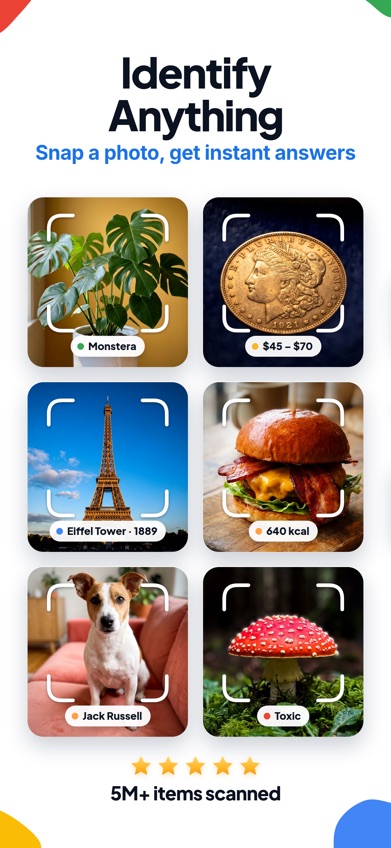
Lens AI is a visual search app that identifies an object and explains what it is in plain language. That's the main difference from the Google Lens app, which focuses mainly on visual web matches and shopping links. If you photograph an unknown tool, insect, coin, or plant, Lens AI aims to name it and add useful context.
It also handles product matching, price comparisons, text translation, reverse image search, and value estimates for collectibles. Results include a confidence score, and you can ask follow-up questions in the app. The website allows one free scan each day; its site describes unlimited scans in the mobile app, with paid access also listed in the stores.
The US App Store showed 4.55 stars from 1,593 ratings, while Google Play showed 4.3 stars from 1,888 reviews and 50,000-plus installs. Those totals are smaller than Google or Bing, but audience size isn't why Lens AI ranks first. Its direct object answers fit this search better. The main catch is price: Pro options include $7.99 weekly, $9.99 monthly, $39.99 yearly, and $89.99 lifetime.
- Plain-language object identification
- Follow-up questions and confidence scores
- Some access requires a paid plan
- Price
- Free download; paid plans from $7.99 weekly, checked October 2026
- Platforms
- iPhone, iPad, Android, and web
Pick Lens AI if you want an answer about the object instead of a list of matching web pages.
Lens AI google lens alternative for iPhoneLens AI for Android

Microsoft Bing Visual Search
4.8 on the App Store (298,365 ratings)
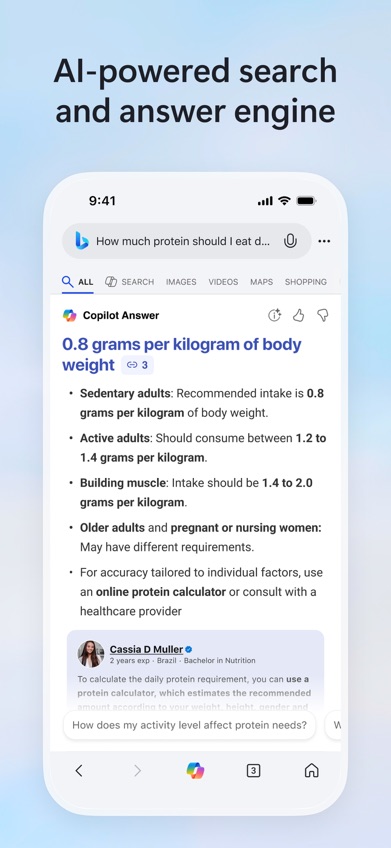
Microsoft Bing Visual Search is the closest free replacement for the classic Google Lens workflow. You can take a photo or upload one, then search for related pages, similar images, products, and text. It sits inside the broader Bing search app on iPhone, much as Lens sits inside the Google app.
Bing's strongest case is reach without a separate visual-search subscription. It works across iPhone, iPad, Android, and the web, according to current platform information. Search results can connect to Copilot summaries and follow-up topics, which helps when the image starts a wider research question.
The iPhone app had 4.75 stars from 298,365 ratings and was updated October 16, 2026. It requires iOS 18.0 or later, so owners of older iPhones are left out. Official free-use limits are unknown, and product searches may return broad visual matches when you need one exact model. Lens AI is better at giving a direct object explanation; Bing is better when your real goal is finding pages, products, or more images for free.
- Free camera and upload search
- Available on major platforms
- The iPhone app requires iOS 18.0
- Price
- Free; official usage limits unknown, checked October 2026
- Platforms
- iPhone, iPad, Android, and web
Pick Bing if you want free visual web search across several platforms.
Apple Visual Intelligence
Apple Visual Intelligence is built into supported iPhones, so there's no separate lens app to install. It can examine something through the camera, identify objects and plants, work with visible text, translate content, and help answer questions about what's on screen or in front of you.
The built-in access is its best feature. When you're pointing your phone at a sign, restaurant menu, or unfamiliar plant, staying in the camera flow cuts out several taps. There isn't a separate App Store rating because Visual Intelligence isn't distributed as its own app. There's also no separate app fee listed.
Compatibility is the problem. Availability depends on your iPhone model, software version, language, and region, and current source material doesn't confirm one simple model list for every US reader. Check the support page on the phone you plan to use. Android owners get nothing here, and people who need a browser upload tool should choose Bing or TinEye. For someone with supported hardware, though, it may be all the Google Lens alternative they need.
- Built into the iPhone camera flow
- Handles objects and visible text
- Limited to supported iPhones and regions
- Price
- No separate app fee; availability checked October 2026
- Platforms
- Supported iPhones
Pick Apple Visual Intelligence if your iPhone supports it and you don't want another app.
TinEye
TinEye is a reverse image search service for finding exact or altered copies of a picture online. Upload a file or paste an image address, and TinEye looks for pages containing that image. It can detect versions that were cropped, resized, or watermarked, which is a different job from identifying the object shown.
That focus makes TinEye the right pick for source checking. Use it when a photo appears in a suspicious post, when you need an older version, or when somebody has reused your work. Its first-seen information can also help you follow an image's publication trail, though no search index covers the entire web.
TinEye won't tell you the species of a flower, translate a menu, or find a chair that merely looks similar. That's where Lens AI, Bing, or Yandex makes more sense. The service is web-based, with browser extensions also reported; there isn't a standard iPhone or Android app in the supplied listings. Available research reports a free limit of 150 searches per day. Consumer paid pricing wasn't confirmed, so check the site before planning heavy use.
- Finds modified image copies
- Useful source and first-seen data
- Doesn't identify general objects
- Price
- Reported free limit of 150 searches daily; paid price: check site
- Platforms
- Web and browser extensions
Pick TinEye if you're tracing where one specific image appeared online.
Yandex Images
Yandex Images is a web visual search tool that takes an uploaded picture and finds similar images or pages. It tends to be most useful when you have part of a picture, a crop, or a photo whose visual details matter more than its metadata.
Its strength is similarity matching. That can help with fashion, locations, artwork, screenshots, and people-related images when a duplicate-only service comes up empty. Since it runs in a browser, you can use it without installing another app. Current research reports free use, though an official daily limit wasn't confirmed.
Yandex gives you search results, not the kind of guided object explanation Lens AI provides. Text translation and structured plant or animal details also aren't the reason to choose it. Be cautious with personal photos: images must be submitted for the search, and you should read the current privacy terms before uploading faces, IDs, private documents, or medical pictures. There's no verified consumer subscription price in the supplied sources. For a free, browser-based hunt for visual lookalikes, it's still a useful specialist.
- Good fit for crops and lookalikes
- Works in a browser
- No guided object explanation
- Price
- Free web use reported; official limits unknown in October 2026
- Platforms
- Web
Pick Yandex Images if similar visuals are more useful than a written identification.

Reversee
4.4 on the App Store (12,864 ratings)
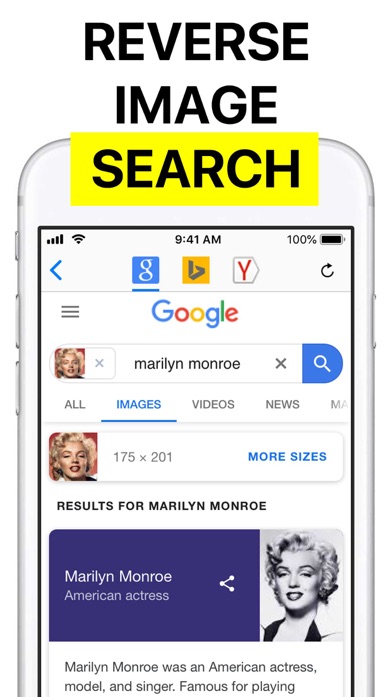
Reversee is an iPhone and iPad bridge to third-party reverse image search engines. Its free version sends an image to Google Images. You can crop or rotate the picture first, paste an image, and open results from the iOS share sheet without digging through your camera roll again.
That share-sheet workflow is the reason to download it. A screenshot in Photos can move straight into reverse search, and the image-size control may produce different matches. The $3.99 Pro upgrade removes ads, adds camera access and extra editing tools, and removes the extension's five-second delay. A separate $1.99 purchase adds Bing and Yandex engines.
Reversee doesn't run its own image index or identification model; the selected search engine produces the result. It can't promise a match, and it isn't built for plant care, translation, or AI explanations. The US App Store showed 4.43 stars from 12,864 ratings, but its last listed update was October 3, 2023. On the plus side, it supports iOS 10.0 or later, making it friendlier to old iPhones than most apps here.
- Useful iOS share-sheet extension
- Supports very old iPhones
- Last listed update was in 2023
- Price
- Free; Pro $3.99 and extra engines $1.99, checked October 2026
- Platforms
- iPhone and iPad
Pick Reversee if you reverse-search screenshots from an older iPhone.

Photo Sherlock
4.7 on the App Store (3,749 ratings)

Photo Sherlock is a simple reverse image search app for photos from your camera or gallery. Before searching, you can crop or rotate an image to remove irrelevant areas. Results open in a built-in browser with back, forward, and reload controls.
The $1.99 Pro purchase is its best argument. It removes ads and lets you open a direct search link in an external browser, so the upgrade costs less than Reversee Pro. The listing suggests uses such as finding an original photo, locating a higher-quality copy, checking where a picture appears, and searching for products.
Don't read those examples as a promise that Photo Sherlock can identify every person or prove that a dating profile is genuine. The app depends on image search results, and weak or unindexed photos may produce little. The US App Store showed 4.67 stars from 3,749 ratings. It was updated June 10, 2026, requires iOS 12.0 or later, and supports iPad. Choose it for basic reverse search on a budget; choose TinEye when source tracing is the main task.
- Cheap one-time Pro purchase
- Crop and rotate controls
- Search results can be inconclusive
- Price
- Free with ads; Pro $1.99, checked October 2026
- Platforms
- iPhone and iPad
Pick Photo Sherlock if you want inexpensive, basic reverse image search on iOS.
Google Lens
4.7 on the App Store (5,256,367 ratings)
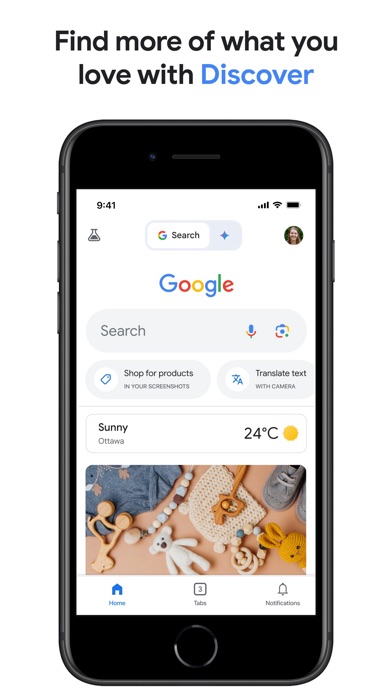
Google Lens remains the benchmark for broad visual web search. It finds related images, shopping results, text, places, and web pages from a camera view or saved picture. You can add words to a visual query, such as asking for the pictured shoes in another color or searching for repair information about a bicycle part.
On iPhone and iPad, Lens lives inside the Google app; Android has a standalone Lens app. Lens itself is free. The iPhone listing had 4.65 stars from 5,256,367 ratings and was updated October 19, 2026. It supports iOS 16.0 or later and 46 languages. That rating count shows enormous reach, though it doesn't make Google Lens an alternative to itself.
Its strength is the web around the picture: product listings, related pages, and follow-up search. Lens AI is the better fit when you want a plain answer naming and explaining an unfamiliar object. People leaving Google for account, privacy, or interface reasons also won't solve that problem by reinstalling the Google app. Pick Lens only if you mainly wanted a comparison and still prefer its search results.
- Broad web and shopping results
- Free with a large search index
- It isn't actually a Google Lens alternative
- Price
- Google Lens is free, checked October 2026
- Platforms
- iPhone, iPad, Android, and web
Pick Google Lens if its web matches are what you wanted all along.
Lens AI vs Google Lens
These two apps overlap, but they answer different versions of the same photo question. Lens AI starts with what the subject is; Google Lens starts with where that image or product connects to the web.
| Point | Lens AI | Rival |
|---|---|---|
| Main result | Plain-language object identification | Visual matches, pages, and shopping links |
| Follow-up help | AI chat about the scanned item | Search refinements and AI search tools |
| Collectibles | Identification plus estimated value clues | Listings and visually related products |
| Free access | Free scans with optional paid access | Google Lens use is free |
| Older iPhone support | Requires iOS 17.0 or later | Requires iOS 16.0 or later |
Lens AI wins when your first question is, "What is this?" Its answer format saves you from opening several matching pages and piecing together the identity yourself.
Google Lens wins for broad shopping and web discovery, and it supports one older iOS generation. If matching pages are the goal, staying with Google is reasonable.
How to choose a visual search app
Start with the job
Object identification and reverse image search aren't the same task. Choose Lens AI for naming a plant, object, animal, or collectible. Choose TinEye when you already know what's pictured and need to find copies. Shopping-focused searches fit Bing or Google Lens. Decide what a useful result looks like before downloading anything.
Check the result format
A label may be enough for an unfamiliar kitchen tool. A collectible needs context, comparable listings, and perhaps a value range. Travel photos may need text translation or landmark details. Look past the camera button and check whether the lens app returns explanations, web pages, products, prices, or only similar pictures.
Read the privacy terms
Visual search often requires uploading the photo. Check where images are processed, how long they're retained, and whether they can be used for model training. Avoid sending faces, IDs, financial papers, private messages, or medical images until you've read the current policy. Face searches also raise consent concerns for the person pictured.
Confirm cost and compatibility
Free can mean unlimited searches, a daily cap, ads, or a trial that rolls into a subscription. Check the renewal screen before accepting weekly access. Device support is just as easy to miss: Lens AI needs iOS 17.0, Bing needs iOS 18.0, and Apple Visual Intelligence requires supported iPhone hardware.
Frequently asked questions
Which Google Lens alternative is best overall?
Lens AI is the best Google Lens alternative for people who want a plain answer identifying an object, followed by details and follow-up questions.
What is the best app for finding duplicate images?
TinEye is the best fit for finding exact, cropped, resized, or watermarked copies and tracing where an image appeared.
Which Google Lens alternative is best for free visual web search?
Microsoft Bing Visual Search is the strongest free cross-platform option for related pages, product results, and similar images.
Can a visual search app work with screenshots?
Yes, many visual search apps accept saved screenshots, though cropping out borders and unrelated content usually gives the search a better subject.
Do Google Lens alternatives work offline?
Offline support isn't confirmed for most apps in this guide, so assume a connection is required unless the current listing explicitly says otherwise.
Are visual search apps accurate?
Accuracy changes with the subject and photo quality; blur, poor lighting, odd angles, and clutter can all weaken the result.
Can I use visual search without a Google account?
Yes, browser-based tools and some standalone apps can be used without a Google account, but sign-in rules and image-handling policies vary.
The Google Lens alternative we'd download
Lens AI is our recommendation for most people because it turns an unfamiliar photo into a direct identification with useful context. Pick Bing if free web and shopping results come first, Apple Visual Intelligence if it's already supported on your iPhone, or TinEye if you're tracking copies of one image.
Lens AI is best for explaining what's in a photo
Lens AI is worth trying for one specific reason: it answers the question "What is this?" in plain language instead of stopping at a grid of related web images. That makes it a good fit for unknown objects, plants, animals, insects, coins, and thrift-store finds.
Its smaller rating count doesn't change that fit. If you mainly want shopping pages, use Bing or Google Lens. If you want the app to identify the subject and let you ask a follow-up question, start with Lens AI.