
Best Wine Apps in 2026
Quick answer: Vivino is the best wine app for most US drinkers because its scanner, large rating community, journal, and shopping tools cover the usual bottle-store questions. DiVino is better for iPhone users who want drinking windows and an on-device cellar without an account. CellarTracker is the stronger pick for a large, carefully organized collection.
You're standing in a wine aisle with dinner in 40 minutes. One label looks classy, another is $8 cheaper, and neither tells you whether the bottle will work with spicy takeout. A good wine app can identify both and give you enough information to pick.
The harder choice is deciding what happens after the scan. Some apps focus on crowd ratings and shopping; others track cellar locations, bottle values, or the right year to open that Cabernet. We ranked eight options by how well they handle those real decisions.
Comparison at a glance
| App | Best for | Platforms | Free version | Price | Standout |
|---|---|---|---|---|---|
| Vivino | Most wine drinkers | iPhone and iPad; Android not confirmed in our sources | Free scanning, ratings, journal, and discovery; exact limits aren't stated | $4.99 monthly or $47.90 yearly for Premium | Large crowd-rating base with label and wine-list scanning |
| DiVino | Private label scans and drinking windows | iPhone on iOS 18 or later; Android is coming soon | Free download; unpaid scan limits aren't stated | $5.99 weekly or $59.99 yearly | Moves a scanned bottle into an on-device cellar with a drinking window |
| CellarTracker | Detailed cellar records | iPhone and iPad; Android not confirmed in our sources | Free download; exact free bottle limit isn't stated | In-app tiers listed from $4.99 to $44.99; check billing period | Bottle locations, tasting records, values, and drinking dates |
| Wine-Searcher | Comparing prices and stores | iPhone and iPad; Android not confirmed in our sources | Free search and label scan; exact limits aren't stated | PRO purchases listed at $10.99 and $98.99; check billing period | Compares bottle listings across merchants |
| InVintory | Visual cellar layouts | iPhone and iPad on iOS 18 or later | Free download; exact inventory limits aren't stated | From $9.99 monthly or $99.99 yearly | 3D locations for racks, bins, cases, and fridges |
| Oeni | Aging and food pairing | iPhone and iPad on iOS 15 or later | Free download; exact free limits aren't stated | Annual purchases listed from $39.99 to $89.99 | Aging estimates plus pairings drawn from over 5,000 dishes |
| Delectable | Free unlimited label scans | iPhone and iPad on iOS 10 or later | Unlimited label scans, ratings, and a wine journal | $5.99 monthly for Premium; $1.99 ad-free purchase listed | Follow sommeliers, winemakers, and critics |
| Wine Identifier | Checking a label-first workflow | iPhone according to its website | Check the site for current access and limits | Check the listing | Combines identification, pairing ideas, and cellar logging |
Prices and ratings from the US App Store and Google Play, checked October 2026. Store prices change; the listing is the final word.
How we picked
We read the supplied US App Store listings, official developer pages, and listed in-app prices in October 2026. We also checked the available research for Google Play support, pricing pages, and help information. Android availability, export rules, and free-tier limits weren't consistently confirmed, so we say so instead of filling gaps.
The order reflects everyday usefulness after a scan: identification, decision-ready bottle information, cellar tools, price, platform requirements, and how recently the app was updated. Store rating totals show audience size. They don't automatically decide rank, which is why the much newer DiVino places near apps with thousands of ratings.
- The scanner should identify the producer and exact vintage when possible.
- Bottle results should help you buy, pair, save, or open the wine.
- Cellar tools should track quantity, location, and drinking dates.
- The free tier and subscription cost should fit the likely use.
- Platform requirements and recent updates affect who can use the app.

Vivino
4.8 on the App Store (139,462 ratings)
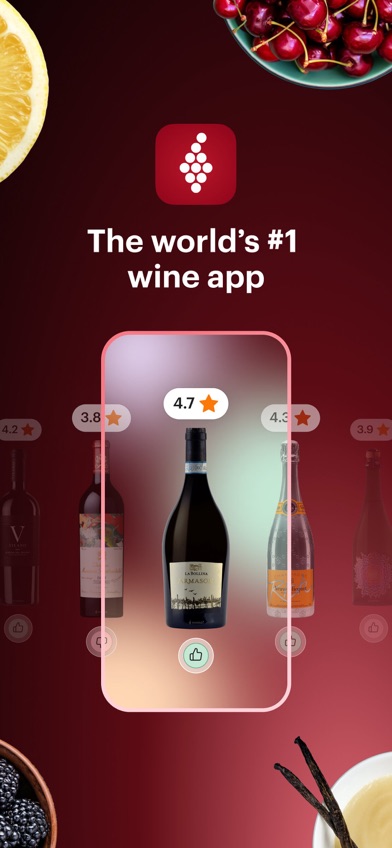
Vivino is the easiest default for someone who wants one wine app and doesn't yet know which specialty tools they'll need. Photograph a label to see crowd ratings, tasting notes, pairings, and related bottles. You can also scan a restaurant list, record what you drank, track a small cellar, and shop from participating merchants. That range is why Vivino ranks first.
Its US App Store listing had 4.84 stars from 139,462 ratings when checked in October 2026, far more rating activity than the other picks here. The app was updated October 19, 2026. Those numbers don't prove that every match or review is right, but they do show a much larger feedback pool than a new wine scanner app has.
The weak point is focus. Crowd scores, personalized suggestions, shopping, social posts, and cellar records share the same app, so collectors may prefer CellarTracker's deeper inventory structure. Crowd ratings also reflect personal taste. Check the vintage before buying, especially when two labels look almost identical. Vivino needs iOS 18.6 or later, which leaves older iPhones out.
- Scans labels and full restaurant wine lists.
- Combines ratings, personal notes, cellar records, and shopping.
- Needs iOS 18.6 or later, and free-tier limits aren't stated.
- Price
- Free download; Premium was $4.99 monthly or $47.90 yearly in October 2026.
- Platforms
- iPhone and iPad; check Google Play for current Android support.
Pick Vivino if you want one app for scanning, crowd ratings, discovery, and keeping a casual wine journal.

DiVino
5.0 on the App Store (1 ratings)
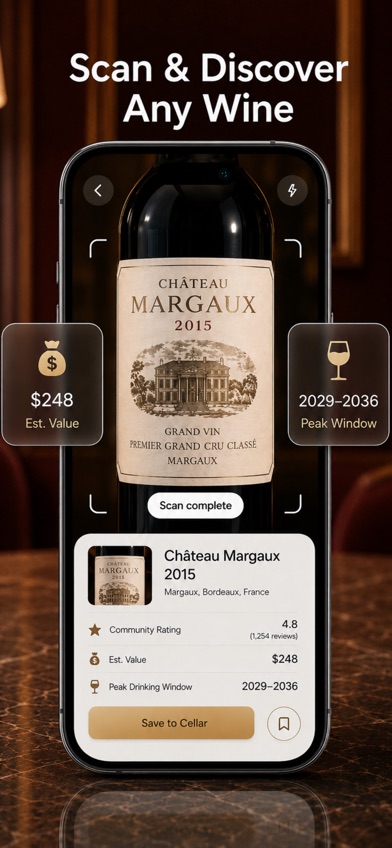
DiVino is an AI wine scanner app that turns a label photo into bottle details, an estimated value, food pairing help, and a suggested drinking window. The last part is its best idea. Instead of saving a mystery bottle and forgetting it for four years, you can see whether the app marks it to hold, drink now, or open near its estimated peak.
A scan can move directly into a searchable cellar with quantity and storage location. There is also a menu scanner, tasting notes, and an AI sommelier for questions about grapes, serving, or dinner. No account is required, and the listing says your collection and notes stay on the device. That's appealing if you don't want another public tasting profile.
DiVino ranks second for feature fit, not audience size. It first appeared in June 2026 and had only one US App Store rating, which was five stars, when checked in October. One rating can't establish broad user reception. The bigger limit is availability: DiVino needs iOS 18 or later, is currently iPhone-only, and says Android is coming soon. The $5.99 weekly plan also gets expensive if you leave it active.
- Shows a drinking window after identifying a label.
- Keeps cellar records and notes on the device without an account.
- New app with one US rating; Android isn't available yet.
- Price
- Free download; PRO was $5.99 weekly or $59.99 yearly in October 2026.
- Platforms
- iPhone with iOS 18 or later; the store lists iPad compatibility.
Pick DiVino if you want to scan a bottle, judge when to open it, and save it privately on your iPhone.

CellarTracker
4.9 on the App Store (13,328 ratings)
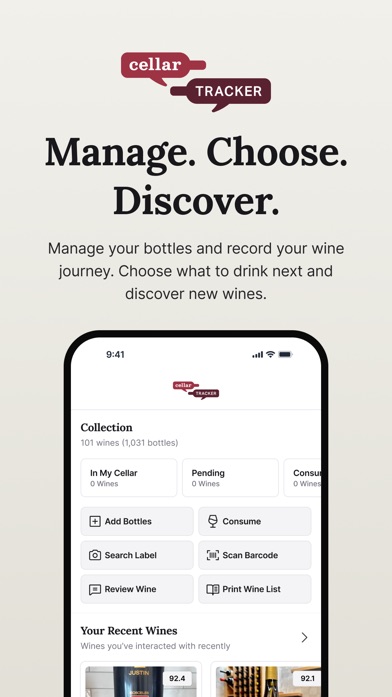
CellarTracker is built around the bottles you own. Its scanner and barcode tools help add wine, while inventory records track quantity, location, tasting notes, estimated value, and drinking dates. That structure suits a collection spread across racks, cases, or more than one storage area.
The listing also describes community tasting notes, professional reviews, historical valuation data, and retail or auction price references. These are useful when you're deciding between drinking, holding, or replacing a bottle. Still, an app estimate isn't a guaranteed resale value. Auction condition, provenance, storage, and buyer demand can change the result.
CellarTracker had 4.9 stars from 13,328 US App Store ratings and was updated September 28, 2026. It works on iOS 15.5 or later, so it supports older Apple hardware than Vivino, DiVino, or InVintory. The tradeoff is density: a casual drinker recording six supermarket bottles may find more fields and collection data than needed. In-app purchase tiers run from $4.99 to $44.99, but the supplied listing doesn't clearly state each billing period.
- Tracks bottle count, storage location, notes, and drinking dates.
- Includes price references and long-term collection records.
- The detailed inventory workflow may be excessive for casual use.
- Price
- Free download; in-app tiers listed from $4.99 to $44.99 in October 2026.
- Platforms
- iPhone and iPad on iOS 15.5 or later; check the listing for Android.
Pick CellarTracker if knowing exactly what you own and where it sits is more important than social discovery.

Wine-Searcher
4.8 on the App Store (17,156 ratings)
Wine-Searcher answers the question that crowd ratings can't: where can you buy this bottle, and what are merchants charging? Scan a label or type the name to compare vintages, critic scores, grape information, and merchant listings. The App Store description cites 8 million wine listings from 55,000 merchants.
That makes Wine-Searcher the specialist pick for checking whether a $65 shelf price looks reasonable. It can also search beer and spirits, locate nearby stores, and pass you to a merchant's site. Prices may still differ by state, shipping destination, tax, vintage, and bottle condition. Treat the result as a shopping reference, then verify the seller and final checkout price.
The app had 4.81 stars from 17,156 US ratings and was updated October 15, 2026. It needs iOS 16 or later. Wine-Searcher isn't as centered on personal taste as Vivino, and its cellar tools aren't the main reason to download it. PRO purchases were listed at $10.99 and $98.99, though the supplied store data doesn't identify the billing period for each price.
- Compares merchant prices and bottle availability.
- Searches wine, beer, and spirits.
- Listed prices aren't guaranteed checkout or resale values.
- Price
- Free download; PRO purchases listed at $10.99 and $98.99 in October 2026.
- Platforms
- iPhone and iPad on iOS 16 or later; check the listing for Android.
Pick Wine-Searcher if price comparison and finding a seller come before social ratings or cellar design.

InVintory
4.8 on the App Store (4,984 ratings)
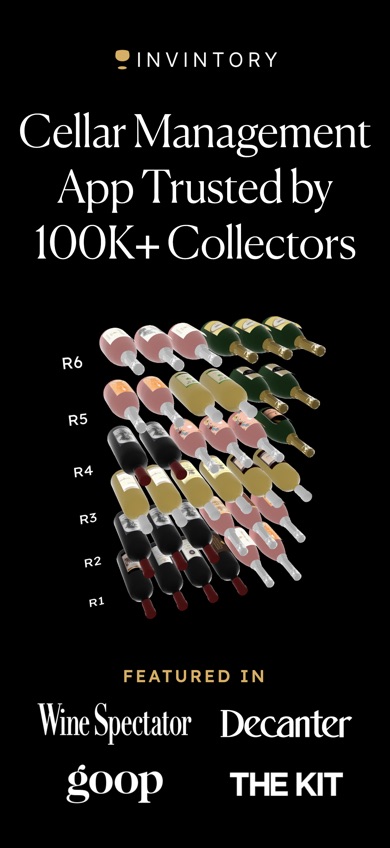
InVintory is for collectors who think in racks and bins, not a single bottle list. Its 3D cellar view can map bottles to a cellar, fridge, case, or custom location. If you've ever pulled out five bottles while looking for one Burgundy, that visual system has an obvious use.
The app can scan labels, import records from CellarTracker, Vivino, or spreadsheets, and track value and maturity. An AI sommelier uses collection information for bottle suggestions, food pairings, and serving advice. Insurance-oriented reports are also listed. This is a wider collector toolkit than Vivino has, though many drinkers won't need its mapping or investment data.
InVintory had 4.76 stars from 4,984 US ratings and was updated October 21, 2026, the newest update among these picks. It requires iOS 18, so older iPhones are excluded. Cost is another dividing line: plans listed include $9.99 monthly and $99.99 yearly, with higher Premium prices reaching $149.99 per year. Check the current tier before importing a large collection because the supplied listing doesn't explain every free limit.
- Maps exact bottle positions in a 3D cellar.
- Imports existing cellar records and tracks collection value.
- Costs more than most picks and requires iOS 18.
- Price
- Free download; paid plans started at $9.99 monthly or $99.99 yearly in October 2026.
- Platforms
- iPhone and iPad on iOS 18 or later.
Pick InVintory if finding a bottle's exact rack or bin is your main cellar problem.

Oeni
4.7 on the App Store (935 ratings)
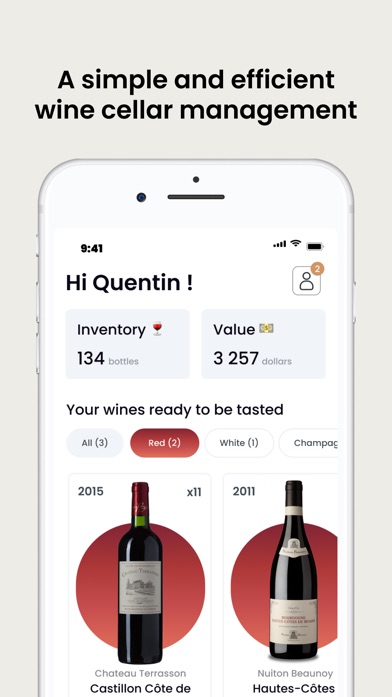
Oeni combines cellar stock with estimates of how each vintage is aging. Add the bottle and purchase price, then use its maturity information to decide what should stay put and what might be ready for dinner. Oeni also has a 3D cellar view and tracks changes in estimated collection value.
Food pairing is the other reason to choose it. The listing says its pairing data covers more than 5,000 dishes, which is more specific than the broad pairing notes found in many scanners. Its wine directory contains more than 400,000 bottles. That's sizable, though smaller than the multimillion-record counts claimed in some competing listings, so an obscure bottle may need manual work.
Oeni had 4.7 stars from 935 US App Store ratings and was updated October 5, 2026. It supports iOS 15 or later and lists 15 languages, the broadest language selection in this group. Pricing is harder to parse: annual purchases between $39.99 and $89.99 appear in the listing, alongside other promotional entries. Confirm the plan and renewal price on the payment screen.
- Connects inventory records with maturity estimates.
- Lists pairing guidance for more than 5,000 dishes.
- The App Store shows several annual prices without simple tier details.
- Price
- Free download; annual purchases listed from $39.99 to $89.99 in October 2026.
- Platforms
- iPhone and iPad on iOS 15 or later.
Pick Oeni if your daily question is what to open with dinner and which bottles need more time.

Delectable
4.7 on the App Store (25,998 ratings)
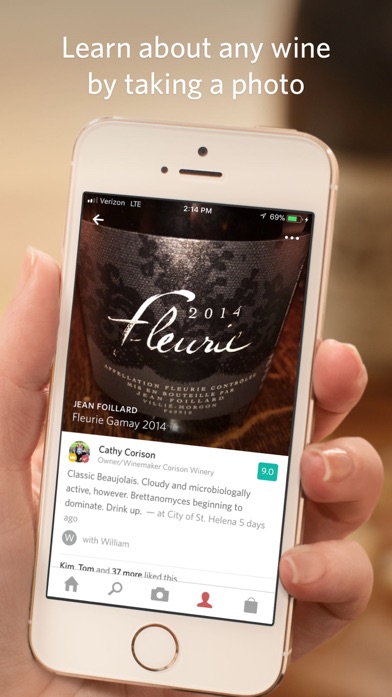
Delectable keeps the basic deal refreshingly simple: photograph labels without a stated scan cap, read tasting notes, rate bottles, and save them to a personal journal. You can follow sommeliers, critics, and winemakers, which gives discovery a more people-centered feel than a plain average score.
The free unlimited scanning claim is its biggest advantage. Delectable also covers beer and spirits, supports wine purchasing, and lets you tag people or locations in journal entries. Premium adds Vinous reviews, priority handling for difficult labels, and an ad-free experience. If your goal is to scan bottles at tastings without counting every use, it has a clear case.
Age is the warning. Delectable had 4.7 stars from 25,998 US ratings, but its last listed update was September 14, 2021. Every other competitor here was updated in 2026. The old iOS 10 requirement helps people with older devices, yet the long update gap raises fair questions about current bottle data, purchasing links, and future compatibility. Check recent store information before paying.
- The listing states that label scans are unlimited and free.
- Lets you follow named wine professionals and keep a journal.
- The last listed update was in September 2021.
- Price
- Free; Premium was listed at $5.99 monthly, with a $1.99 ad-free purchase.
- Platforms
- iPhone and iPad on iOS 10 or later.
Pick Delectable if you want free unlimited scans and enjoy following individual wine professionals.
Wine Identifier
Wine Identifier is a label-scanning concept centered on quick bottle identification, pairing ideas, tasting notes, and cellar records. Its website describes photographing a label to retrieve details such as producer, region, grape, and vintage when available. A matched bottle can then be saved with your own notes and collection information.
The page is unusually direct about scanner errors. Rare wines, damaged labels, old vintages, and import stickers can produce an incomplete or incorrect match, so you should compare the displayed producer and vintage with the bottle. That's sound advice for every wine scanner app. Recognition is an aid, not authentication of the wine inside the glass.
Wine Identifier ranks last because the supplied sources don't include a separate US App Store record, store rating, update date, or confirmed subscription price for this entity. The website points toward an iPhone experience, but you should check the current download page and payment screen before committing. Readers who already know they want the related scan, pairing, and cellar flow will get more concrete store information from DiVino's listing.
- Explains a direct scan-to-pairing and cellar workflow.
- Acknowledges that damaged or obscure labels may need manual checking.
- No separate store rating, update date, or price was confirmed.
- Price
- Check the listing for current pricing.
- Platforms
- The website references iPhone use; check the current listing for requirements.
Pick Wine Identifier if its label-first approach fits you and you're willing to verify the current app listing and price.
Vivino vs DiVino for scanning and saving wine
Vivino and DiVino both start with a camera, but they lead you in different directions. Vivino connects the scan to a large crowd, shopping, and taste discovery. DiVino turns the scan into private bottle guidance and an on-device cellar.
| Point | Vivino | Rival |
|---|---|---|
| Store rating history | Vivino had 4.84 stars from 139,462 US ratings. | DiVino had five stars from one US rating. |
| After the label scan | Vivino centers ratings, reviews, recommendations, and purchasing. | DiVino centers estimated value, pairing, and the drinking window. |
| Restaurant use | Vivino can scan a full wine list and rank possible matches. | DiVino can scan a menu and answer questions through its AI sommelier. |
| Accounts and storage | Vivino builds a taste profile and social wine history. | DiVino requires no account and keeps its cellar and notes on the device. |
| Cost | Vivino Premium was $4.99 monthly or $47.90 yearly. | DiVino PRO was $5.99 weekly or $59.99 yearly. |
Vivino wins for most people because its rating pool, free starting point, journal, and shopping tools answer more common questions. It also has a much longer public rating history.
DiVino wins when you care more about the bottle already in your hand: when to drink it, what to eat with it, and where to save it without creating an account. Its audience evidence is tiny, so early users are accepting more uncertainty.
What to check before downloading a wine app
Check the exact vintage match
A scanner can recognize the producer while selecting the wrong year or a similar bottling. That can change price, critic notes, and the suggested drinking window. Compare the app result with the small print on the bottle before saving or buying. Collectors should also look for barcode entry and manual editing, since torn labels and older vintages can defeat even a good scanner.
Decide whose ratings you want
Crowd scores help when you want a fast read on broad taste. Critic reviews, sommelier notes, and followed winemakers answer a different need. No score is a lab measurement, and a highly rated oaky Chardonnay may still be wrong for you. Pick an app that lets you record personal ratings if you want later suggestions based on your palate.
Match cellar tools to collection size
A simple favorites list is enough for six bottles above the refrigerator. Once bottles fill racks or multiple storage areas, look for quantities, locations, purchase history, drinking windows, and export. Serious collectors should check whether valuation reports or insurance exports cost extra. Confirm that your records can be moved before entering hundreds of bottles.
Read the subscription screen
A free download doesn't mean every scan, recommendation, or cellar slot is free. Check scan caps, bottle limits, ads, exports, valuation data, and renewal periods. Weekly subscriptions deserve special attention because a low-looking payment can exceed an annual plan quickly. Prices here were checked in October 2026, but the payment screen is the final source before purchase.
Frequently asked questions
What is the best free wine app?
Vivino is the best free starting point for scanning labels, reading crowd ratings, and recording bottles. Its listing doesn't state every free-tier limit, so check the current subscription screen.
Which wine app is best for tracking a cellar?
CellarTracker is the best fit for detailed quantities, locations, tasting records, values, and drinking dates. InVintory is better if you want a 3D map of racks and bins.
Which wine app identifies bottles most accurately?
There isn't a current head-to-head accuracy test in the supplied sources. Any wine scanner app can select a similar label or wrong vintage, so compare the result with the bottle.
Can a wine app recognize old or rare vintages?
A wine app may recognize an old or rare vintage, but database gaps, damaged labels, and import stickers can cause errors. Manual search and editing are still useful.
Are wine app prices accurate?
Wine app prices may be merchant listings or estimated retail averages, not guaranteed checkout or resale values. Verify the vintage, seller, shipping, tax, and bottle condition.
Can my phone scan a restaurant wine list?
Vivino and DiVino both list restaurant wine-list or menu scanning. Results still need a quick vintage and price check against the printed list.
What is a good Vivino alternative?
Wine-Searcher is a good Vivino alternative for comparing merchant prices, while CellarTracker is better for detailed cellar inventory. Choose based on what you need after the scan.
Our wine app verdict for 2026
Download Vivino if you want the best all-purpose wine app: it covers label scans, crowd ratings, restaurant lists, a personal journal, and shopping without forcing you into a collector's workflow.
Pick DiVino when drinking windows and private on-device cellar records are the priority. CellarTracker is the better choice for a large collection, while Wine-Searcher wins when your first question is price.
Try DiVino for scan-to-drinking-window guidance
DiVino's strongest feature is its scan-to-drinking-window flow. Photograph a label, review the suggested stage, then save the bottle with its quantity and storage location. That directly answers a common home-cellar question: should you open this tonight or leave it alone?
It suits iPhone users who want bottle guidance and private records without opening an account. The app is new, has very little public rating history, and charges $5.99 weekly or $59.99 yearly for PRO, so the annual plan deserves a careful look before subscribing.